Can AI Replace Multiple Creative Subscriptions?
If you're tired of juggling multiple subscriptions for writing, design, and video tools, you're not alone. Many creators in the U.S. spend $80 or more monthly on fragmented services, leading to financial strain and workflow inefficiencies. All-in-one AI platforms like Soloa AI aim to solve this by combining text, image, video, and audio tools into a single subscription, starting as low as $9.99/month.
While platforms like Adobe Creative Cloud offer unmatched precision and control, they come with higher costs ($60–$70/month) and complexity. Soloa AI simplifies workflows and cuts costs but sacrifices some manual control. The best solution often lies in blending AI tools for speed with specialized software for fine-tuning.
Key Takeaways:
- Cost: Soloa AI starts at $9.99/month vs. Adobe's $60+ for multiple apps.
- Ease of Use: Soloa AI offers a unified dashboard, while Adobe requires switching between tools.
- Control: Adobe excels in precision; Soloa AI focuses on efficiency.
For freelancers or small teams, Soloa AI can reduce costs and simplify tasks. For professionals with specific needs, a hybrid approach - using AI for repetitive tasks and niche tools for final touches - may work best.
1. Traditional Multi-Subscription Creative Software
Capabilities Across Creative Tasks
When it comes to creative software, traditional options like Adobe Creative Cloud have long been a go-to for professionals. With over 20 specialized applications for tasks like design, image editing, video production, and audio work, these tools are built for tackling complex projects. It's no surprise they're trusted by industry experts.
One of Adobe's standout features is its integrated ecosystem. Users gain access to more than 30,000 professional fonts, over one million free stock assets, and cloud libraries that make it easy to share resources across projects. For teams, integration with platforms like Frame.io streamlines video review workflows, while shared libraries ensure asset updates sync seamlessly across files. This interconnected approach saves time and keeps everything running smoothly.
Cost and Pricing Models
Adobe Creative Cloud offers several pricing tiers. The Pro plan costs $69.99/month (billed annually) and includes 20+ apps along with 4,000 monthly generative credits. For those with simpler needs, single-app plans start at $22.99/month but come with fewer tools.
In a 2025 analysis of his software expenses, ZDNET Senior Contributing Editor David Gewirtz revealed that Adobe Creative Cloud accounted for $790 of his $1,665 total annual AI-related spending. To cut costs, he downgraded from the $70/month All Apps plan to a $20/month Photography plan, saving $600 per year. However, this shift came with a tradeoff - his generative AI credits dropped from 4,000 to just 25 per month. Reflecting on the decision, he shared:
"I really should have dropped the big Adobe expense much earlier -- $70 is a lot to spend each month. While $20 for Photoshop is still costly, I view it as an almost unavoidable expense due to how tightly integrated Photoshop is into my workflow".
Workflow Integration and Usability
Managing multiple tools and subscriptions often disrupts workflows. Mike Polner from Adobe summed it up well:
"Keeping track of all those resources, jumping from site to site to use them, and paying all those subscription fees is expensive - and a lot of work".
For many professionals, juggling creative software alongside various AI subscriptions can push monthly expenses to $70–$110. This "subscription creep" leaves users paying for tools they rarely use, all while switching between platforms to complete a single project.
Even Adobe’s generative credit system adds complexity. As Jacob Roach from Wired pointed out, Firefly features can consume anywhere from 10 to 150 credits per use, making it difficult to predict monthly credit needs.
Scalability for Freelancers and Teams
Freelancers often face tough decisions when it comes to Adobe’s pricing. The $60–$70/month All Apps plan offers a comprehensive set of tools and 4,000 AI credits, but many opt for cheaper plans to save money, which limits their access to AI features. Additionally, Adobe restricts app usage to two devices at a time, which can be limiting for those who work across multiple setups.
For teams, the costs climb even higher. Creative Cloud for Teams costs $89.99/month per license and includes centralized license management and round-the-clock technical support. For creators with heavy AI demands, Adobe also offers Firefly Premium at $169.99/month, which includes 50,000 credits and unlimited access to video models.
These steep costs and limitations have sparked interest in alternative solutions that promise to simplify workflows and reduce expenses.
sbb-itb-7afdda7
2. Soloa AI (All-in-One AI Platform)
Capabilities Across Creative Tasks
Soloa AI brings together over 50 AI models and tools in one platform, making it a powerhouse for generating text, images, audio, and video. Its imaging tools include features like photorealistic generation, photo restoration, background removal, and AI-driven editing. On the video front, it can create footage based on text prompts or reference images. For audio tasks, its voice synthesis capabilities are perfect for podcasts, voiceovers, and narration.
By combining these tools into a single platform, Soloa AI tackles a major challenge for creative professionals: the hassle of managing multiple subscriptions and platforms. This consolidation not only saves time but also reduces costs, offering a more efficient way to handle creative projects. Plus, its unified dashboard and simplified pricing structure make it easier to manage everything in one place.
Cost and Pricing Models
Soloa AI's pricing is designed to keep things simple and accessible. It starts with a free plan that includes 10 credits per month. For those who need more, the Basic plan costs $9.99/month and offers 100 credits along with email support. The Pro plan, priced at $29.99/month, provides 300 credits, priority support, advanced analytics, and API access. Users can also purchase additional credit bundles, ranging from 50 to 620 credits, priced between $4.99 and $59.00.
This straightforward pricing approach eliminates the common issue of "subscription creep", where multiple app subscriptions add up to significant costs. With Soloa AI, everything is consolidated into a single, predictable expense.
Workflow Integration and Usability
Soloa AI's interface is designed for seamless usability. Instead of juggling multiple logins and platforms, users can handle everything - whether it’s writing, image creation, video editing, or voiceovers - within the Soloa AI ecosystem. This streamlined workflow not only saves time but also reduces the mental effort required to switch between various tools and systems.
Scalability for Freelancers and Teams
Soloa AI caters to both individual freelancers and larger teams with scalable options. Freelancers can start with the affordable Basic plan, while teams can opt for the Plus plan, which includes 900 credits per month, dedicated support, and service level guarantees. For those with fluctuating needs, the credit-based system allows users to purchase extra capacity as required, offering flexibility that traditional subscription models often lack. This ensures predictable costs while accommodating growth and changing demands.
Pros and Cons
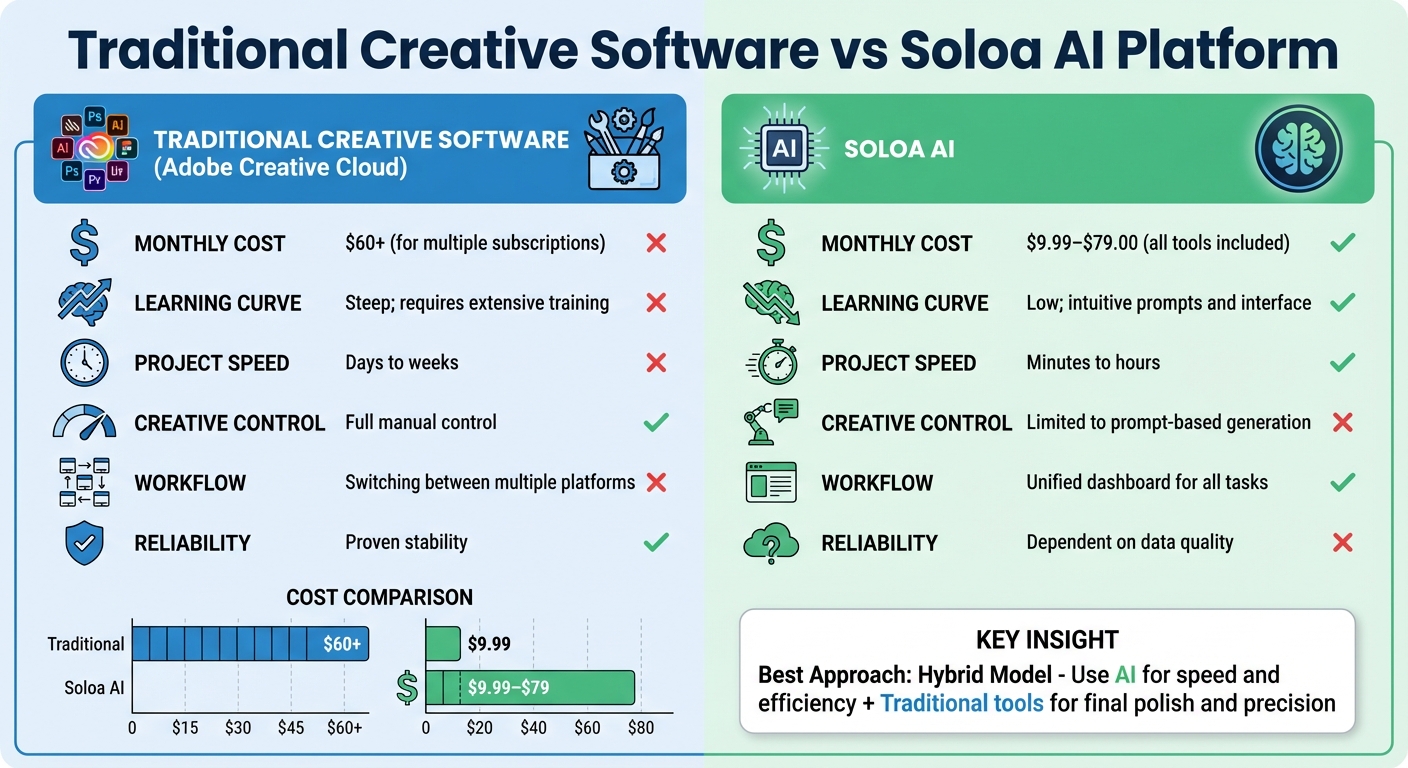
Traditional Creative Software vs Soloa AI: Cost and Features Comparison
Now that the core features are laid out, it's time to weigh the strengths and weaknesses of each option. Deciding between traditional creative software and Soloa AI platforms boils down to understanding the trade-offs - what you gain versus what you might compromise.
Traditional tools like Adobe Photoshop, Premiere Pro, and Final Cut Pro are known for offering precise manual control, allowing users to fine-tune every design detail. But that level of control comes at a cost - both in time and effort. Tasks that can now take mere minutes with AI often required days or even weeks using these traditional methods.
Cost is another major dividing line. Traditional software often involves multiple subscriptions and scattered workflows, whereas Soloa AI consolidates everything into a single subscription starting at just $9.99 per month.
Beyond cost and ease of use, the choice also hinges on creative control versus efficiency. Traditional software delivers consistent, reliable results, while AI platforms depend on the quality of their data and periodic algorithm updates. AI shines when it comes to repetitive tasks like removing backgrounds or generating initial layout drafts, but it falls short when it comes to the emotional nuance and cultural sensitivity that human designers bring to the table. Interestingly, travel companies using AI-driven designs reported an 82% increase in customer preference, showcasing AI's potential for specific use cases.
| Feature | Traditional Creative Software | Soloa AI |
|---|---|---|
| Monthly Cost | $60+ for multiple subscriptions | $9.99–$79.00 for all tools |
| Learning Curve | Steep; requires extensive training | Low; intuitive prompts and interface |
| Project Speed | Days to weeks | Minutes to hours |
| Creative Control | Full manual control | Limited to prompt-based generation |
| Workflow | Switching between multiple platforms | Unified dashboard for all tasks |
| Reliability | Proven stability | Dependent on data quality |
As the table shows, traditional tools provide depth and precision, while Soloa AI simplifies the process and speeds up workflows. For many creators, the best solution lies in combining the two. Soloa AI can handle time-consuming tasks like photo restoration, voiceover generation, or rough drafts, while traditional tools come into play for the final polish or when a specific artistic vision is required.
Data scientist Briana Brownell sums it up well:
"The key to avoiding slop with these tools is injecting your own human creativity, direction, and taste".
This hybrid approach offers a balance, paving the way for more informed recommendations.
Conclusion
Whether Soloa AI can replace multiple creative subscriptions depends entirely on your specific needs and how you prioritize your workflow.
For freelancers and small teams aiming to save money without compromising on essential tools, Soloa AI offers an appealing solution. With pricing ranging from $9.99 to $79.00 per month, it provides access to top-tier models like those from Google, OpenAI, Luma AI, and ElevenLabs. This eliminates the hassle of managing multiple $20 subscriptions, which can quickly add up to $60 or more each month. Plus, its unified dashboard simplifies the process. As Adobe’s Mike Polner puts it, “No more switching between a dozen sites on a dozen tabs just to get your work done.”
However, specialized creators - such as concept artists or brand designers who require precise aesthetic control - may still find value in keeping a niche tool alongside Soloa AI. Chase Jarvis captures this sentiment perfectly: “We don’t need toys. We need tools that ship work”. If your work demands a specific visual style or exact brand consistency, a hybrid approach might be the way to go. Soloa AI can handle the bulk of your tasks, while specialized software can be reserved for final touches or unique creative requirements.
Ultimately, efficiency in your process is what matters most - not loyalty to a particular tool. The flexibility to adapt your workflow as models evolve is key. Soloa AI excels at managing large-scale tasks, while specialized tools remain indispensable for refining and perfecting your work. Just be sure to confirm commercial rights and intellectual property protections when using AI-generated assets for major clients, especially in high-stakes projects.
Rather than being just a subscription replacement, Soloa AI redefines your creative process - making production faster, more cost-effective, and more accessible for creators everywhere.
FAQs
Can Soloa AI replace multiple creative software subscriptions?
Soloa AI transforms the way you approach creative work by combining brainstorming, asset creation, and production into a single, easy-to-use platform. Forget about juggling multiple tools or managing countless subscriptions - Soloa AI lets you handle everything from generating graphics to editing videos, all in one place. This not only saves time but also eliminates the frustration of switching between different software.
The platform’s intuitive, prompt-based controls make it incredibly user-friendly. Just describe what you need in plain language, and the AI takes care of the heavy lifting - whether it’s removing backgrounds, adjusting styles, or editing videos. By automating repetitive tasks and offering real-time suggestions, Soloa AI frees you up to focus on your creative vision instead of getting bogged down by tedious details.
Because it’s cloud-native, Soloa AI makes collaboration seamless. Team members can share a workspace to review, comment on, and approve assets, speeding up feedback loops and ensuring projects are completed faster. And with its affordable pricing compared to traditional software subscriptions, Soloa AI provides a smarter, more efficient way to bring your ideas to life.
How can Soloa AI help save money compared to multiple creative software subscriptions?
Soloa AI’s subscription model brings a budget-friendly alternative to juggling multiple creative software plans. Think about it - many professionals shell out over $20 per month for individual AI tools, then tack on premium creative suites that can run anywhere from $500 to $1,000 per year. Those costs can pile up fast, especially as prices across platforms keep climbing.
With Soloa AI, you get everything in one place - graphic design, video editing, image generation, and content creation - bundled into a single, affordable plan. This not only cuts down on your overall expenses but also makes life easier with one straightforward payment. No more juggling multiple subscriptions or dealing with unpredictable costs.
Can Soloa AI provide the precision and control needed by specialized creators?
Soloa AI is one of many AI-driven creative tools emerging to streamline workflows and combine multiple features into one platform. However, information about how well it provides the precise control that specialized creators often need isn’t readily available. While these tools aim to boost efficiency and cut costs, their ability to address niche creative demands likely depends on how customizable and advanced their features are.
To get a clear picture, checking Soloa AI's product documentation or contacting their support team directly would be the best way to determine if it suits your unique creative needs.
All-in-One AI Platform
Try These AI Tools Free on Soloa
50+ AI models for image, video, voice, and music. One subscription, no switching between tools.