Complete Checklist: Choosing an All-in-One AI Platform

Choosing the right all-in-one AI platform can save time, cut costs, and simplify workflows by combining tools like text generation, video editing, and data analysis into one system. Here’s what you need to know:
- Define Your Needs: Start by identifying your key tasks (e.g., content creation, coding, or research) and list essential vs. optional features.
- Evaluate Core Features: Look for platforms offering tools across text, image, video, and audio creation. Check for access to advanced AI models like GPT-5.2 or Gemini 3 Pro.
- Check Scalability: Understand credit-based pricing and subscription plans to ensure the platform grows with your needs without hidden costs.
- Test Usability: Ensure the interface is easy to use for both technical and non-technical users. Reliable support and clear documentation are critical.
- Assess Integration: Verify compatibility with your existing tools (e.g., Slack, Salesforce) and look for robust API access to streamline workflows.
- Measure Performance: Test speed and output quality with real tasks to ensure the platform delivers accurate, professional results.
- Review Security: Confirm data protection measures, compliance with regulations (e.g., GDPR), and uptime guarantees to avoid risks.
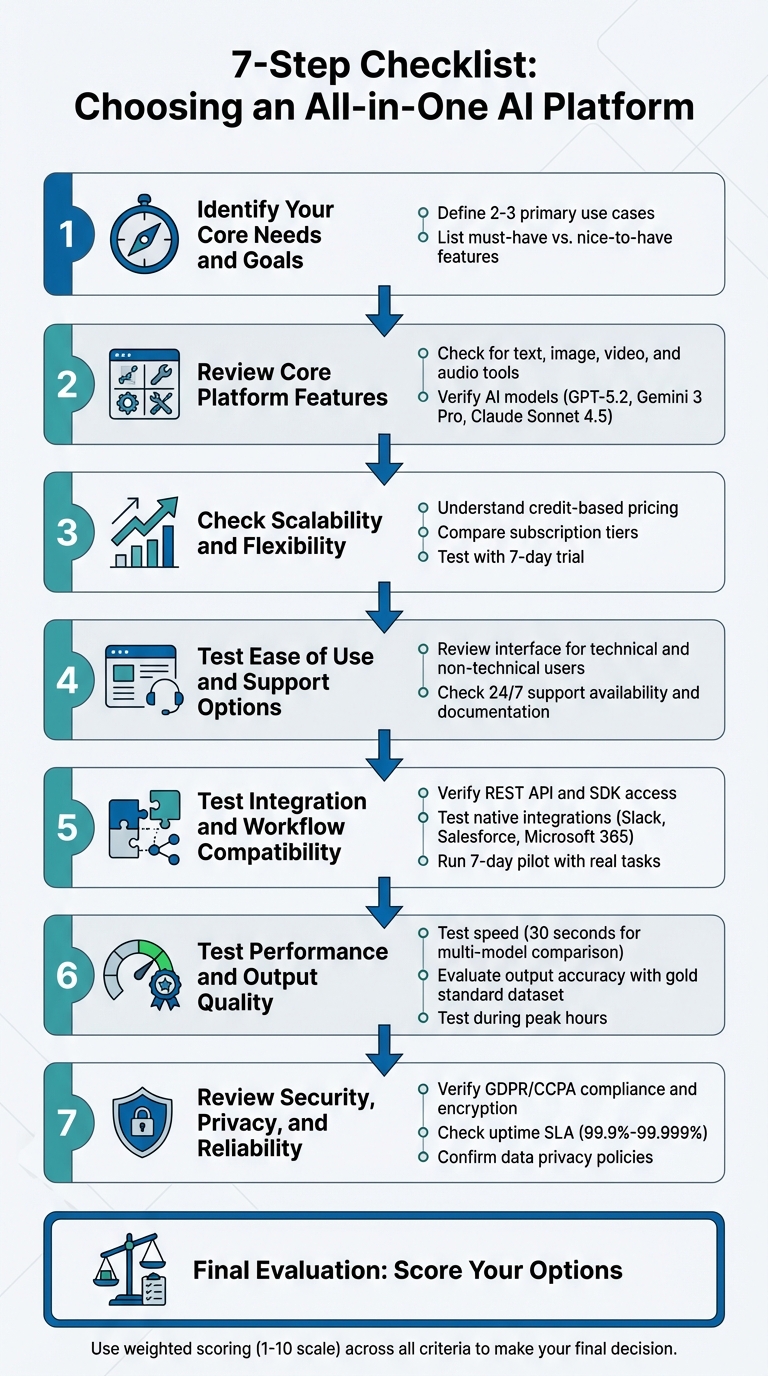
7-Step Checklist for Choosing an All-in-One AI Platform
Choosing You AI Platform for Your Workflow
sbb-itb-7afdda7
Step 1: Identify Your Core Needs and Goals
Before diving into platform evaluations, take a moment to map out your primary tasks. A YouTube content creator will have vastly different needs compared to a software developer debugging code or a researcher analyzing academic studies. Pinpointing your specific use case makes it much easier to filter out platforms that aren’t a good fit. This step sets the stage for a more targeted and efficient evaluation process.
"Organizations that clearly define their use cases before platform selection achieve significantly higher adoption rates and ROI." – Dr. Hernani Costa, Founder & CEO, First AI Movers
Whether your focus is on content creation, video production, voice synthesis, research, coding, or business automation, knowing your priorities is essential.
Define Your Use Cases
Start by identifying 2–3 tasks you handle regularly. For instance, if you’re a small business owner, your typical use cases might include drafting newsletters, transcribing client meetings, or designing social media graphics. A filmmaker, on the other hand, might need tools for creating character keyframes across scenes with multi-image fusion and sourcing royalty-free music. Testing platforms against these specific needs ensures you get practical, relevant insights.
List Your Required Features
Break down your feature needs into two categories: "must-have" and "nice-to-have." This approach helps you avoid unnecessary expenses. For example, must-have features might include SEO-focused text editing, photo restoration capabilities, or API access for automating workflows. Meanwhile, nice-to-have features could include advanced voice cloning for branding or tools that summarize and synthesize information from hundreds of sources. By clearly distinguishing between these categories, you can stay focused and prevent feature overload from inflating your budget.
Step 2: Review Core Platform Features
Now it's time to dive into the platform's core features. A major perk of an all-in-one AI platform is how it simplifies workflows by combining tools for text generation, image editing, video creation, and audio synthesis into one streamlined solution. This step builds on your earlier needs assessment to pinpoint the platform’s standout capabilities.
Explore the Available Tools
Start by evaluating the platform’s essential content creation tools. Make sure it supports all four key content types: text, images, video, and audio. Look for advanced text editing options and image features like background removal, photo restoration, and AI-generated artwork. For video, the tools should range from basic editing to more advanced processing. On the audio side, check for voice synthesis and transcription capabilities.
Assess AI Model Integration
Take a close look at the AI models the platform uses. Top-tier platforms often integrate advanced models like GPT-5.2, Gemini 3 Pro, and Claude Sonnet 4.5, offering robust solutions for a wide range of tasks. Some platforms even provide access to multiple models through a single dashboard. Pay attention to whether the platform uses native integrations - which typically consume fewer credits - or third-party APIs, which could lead to additional costs.
Step 3: Check Scalability and Flexibility
As your needs grow, the platform you choose should scale effortlessly while keeping costs manageable. Whether you're working on a handful of projects or tackling high-volume tasks, understanding how the platform handles scaling can help you avoid hitting usage limits - and ensure you only pay for what you actually use.
Understand Credit-Based Systems
Many platforms operate on credit-based systems, where you're charged based on usage. The number of credits consumed depends on the complexity of the task. For example, generating a short text response typically uses fewer credits than more resource-intensive tasks like creating videos or processing detailed images. Keep a close eye on your credit usage during the first month to pinpoint high-consumption activities and adjust your allocation accordingly. Once you understand your usage patterns, you can evaluate which subscription plan suits your needs best.
Compare Subscription Plans
Soloa AI offers a range of subscription plans designed to balance predictable costs with scalable access. Here's a breakdown of the options:
- Free: Includes 10 credits per month.
- Basic: $9.99/month, offering 100 credits.
- Pro: $29.99/month, with 300 credits and priority support.
- Plus: $79.00/month, providing 900 credits and early access to new models.
Paid plans deliver up to five times the usage capacity of the free tier, along with perks like priority access during busy periods. To find the right fit, consider running a 7-day trial using your actual workload to estimate credit consumption.
If your usage occasionally spikes, you can also purchase credit top-up packages. These range from $4.99 for 50 credits to $59.00 for 620 credits, giving you the flexibility to manage short-term increases without committing to a higher subscription tier.
"Successful AI adoption matches platform strengths to specific business workflows rather than chasing benchmark leaderboards or hype cycles."
- Dr. Hernani Costa, Founder & CEO, First AI Movers
Step 4: Test Ease of Use and Support Options
A user-friendly platform can make all the difference in how quickly your team adopts it and integrates it into their workflow. Even the most feature-packed tool loses its value if it’s too complicated to use. That’s why testing the interface and support options during your evaluation is absolutely critical. A smooth user experience directly impacts how quickly your team can start seeing results.
Review the User Interface
The best platforms are designed so users can navigate and use their tools with little to no training. When testing, involve a mix of team members, including those who aren’t technically inclined. This helps you assess whether non-technical users can easily find tools and create content without frustration. Also, check if the platform requires coding knowledge or if it enables immediate content creation for all skill levels.
If the platform feels overly complicated or has a steep learning curve, consider it a warning sign. Look for features like intuitive navigation, clear labels, and the flexibility to switch between basic and advanced modes as your team’s expertise grows. Accessibility is another key factor - make sure the platform supports screen readers and adheres to Web Accessibility Standards.
"The more transparent the interface, the better your team can iterate and innovate."
- Glidix Technologies
Once you’ve explored the interface, it’s time to evaluate the support options available for users.
Check Support Availability
Even with a well-designed interface, reliable support can be a lifesaver when issues arise. The support system should align with your workflow and goals. Start by looking into the available support channels. Does the platform offer email, live chat, phone support, or even dedicated Slack channels? For critical operations, confirm whether 24/7 technical support is available and if there are clear SLAs for response times and uptime.
Self-service resources are equally important. Comprehensive documentation and tutorials can help users troubleshoot problems quickly without waiting for assistance. Some platforms also offer premium options like priority support, dedicated account managers, or consulting services to navigate more complex setups.
Here’s a practical tip: ask the vendor for a copy of their product roadmap from a year ago. Compare it to what they’ve actually delivered. This simple test can give you insight into how well they stick to their commitments and whether they’re consistently improving their platform.
Step 5: Test Integration and Workflow Compatibility
Even the most advanced AI platform won’t help if it doesn’t play nice with the tools your team relies on daily. The ability to integrate seamlessly with your existing systems determines whether AI simplifies your workflow or adds extra hassle. Before committing to a platform, ensure it can connect to your current tools and automate repetitive tasks without requiring constant developer intervention. Let’s break down how API access and workflow automation can make integration smooth and effective.
Verify API Access
To make AI truly useful, the platform should provide REST APIs and language-specific client packages (like Python, JavaScript, and C#) that allow you to embed AI directly into your workflows. This means you can trigger AI processes from within your existing applications instead of switching between multiple tools. Platforms that generate stable API endpoints for deployed models are a huge plus - they eliminate the need for complex infrastructure setup and let you get started quickly.
Check if the platform also offers SDKs and client packages tailored to your programming languages. This minimizes the amount of extra integration coding required. Another helpful feature is “Structured Outputs,” where AI responses follow a predefined JSON schema. This makes it much easier for your systems to process the data accurately.
Beyond basic API connections, integration should extend to open-source frameworks like PyTorch and TensorFlow, as well as databases like MongoDB, Redis, and PostgreSQL. If your team uses specialized tools, look for platforms that offer native integrations with widely used software such as Salesforce, Slack, HubSpot, or Microsoft 365. Native integrations are more reliable than custom-built ones, which often break when third-party services update their APIs.
Test Workflow Automation
Automation is what separates AI platforms that save time from those that create extra work. Platforms with “orchestration pipelines” can unify tools across data analytics and machine learning, allowing you to automate multi-step processes without needing to write code. Some platforms even include visual, no-code builders so non-technical team members can design workflows that connect thousands of apps.
Run a 7-day pilot with real tasks from your daily operations. Focus on testing how well the platform integrates with your existing tech stack. For example, ensure that AI outputs flow directly into your CRM, project management software, or content management system. Manual data transfers can kill efficiency.
Some advanced platforms offer “tool use” capabilities (sometimes called function calling), enabling the AI to interact with external tools through API calls. A great example is JPMorgan’s COIN system, which uses AI to analyze commercial loan contracts, saving the company an impressive 360,000 hours of labor annually. Similarly, IBM Watson chatbots have been shown to handle 55% of customer inquiries, routing the rest to human agents more effectively. These aren’t just theoretical perks - they show how proper integration can turn AI into a genuine productivity booster.
"The difference between an AI platform and a standalone tool is flexibility... Platforms allow you to customize inputs, chain together outputs, and integrate them into your team's existing stack."
- Flo Crivello, CEO, Lindy
Before committing to a platform, take the time to document your current systems and pinpoint potential integration challenges, like scattered data or inconsistently formatted documents. Clean, well-organized data is critical - messy inputs can lead to unreliable AI analysis. Also, confirm the platform includes role-based access controls and secure endpoint protection to safeguard your data during automated processes.
Step 6: Test Performance and Output Quality
After confirming that the platform integrates smoothly with your workflow, the next step is critical: evaluating how quickly it delivers results and whether the output meets professional standards. While speed is important for managing multiple projects, the quality of the output determines its actual usability. A fast platform that produces subpar results won't save time if you’re stuck revising its work. Here's how you can assess both speed and quality effectively.
Test Speed and Efficiency
Start by evaluating the platform's ability to handle real-world tasks promptly. Advanced tools can compare results from multiple models, such as GPT-4, Claude, and Gemini, side by side in about 30 seconds. For more demanding tasks, some research tools can generate detailed 20-page reports - complete with citations and visuals - in just 4 to 5 minutes. These benchmarks give you a sense of what’s achievable.
Make sure to test how consistent these speeds are under different conditions. Factors like token efficiency variations or provider outages can impact performance. Instead of relying solely on advertised speeds, monitor real-world performance during your trial. Some platforms even offer "Live Authoring" features, which provide instant feedback during content creation. This eliminates the traditional "write-run-debug" cycle and significantly speeds up production. AI-native platforms, in particular, can boost task creation speeds by 85% to 93% compared to manual scripting.
Testing during peak hours is essential to see if performance holds steady. Check whether the platform uses caching to handle repetitive tasks more efficiently, but also verify that this doesn’t result in outdated or incorrect responses. For critical workflows, platforms with "self-healing" capabilities - designed to fix broken workflows automatically with 95% accuracy when UI elements change - can help minimize downtime.
Check Media Quality
Speed is only part of the equation; the quality of the output is equally, if not more, important. Early in your evaluation, establish a "gold standard" dataset - a curated collection of ideal question-answer pairs or reference texts. This will act as a benchmark for comparing model performance across platforms. Use identical prompts and assets with every tool to ensure objective comparisons.
For text outputs, assess factors like factual accuracy, alignment with your brand voice, formatting consistency, and relevance to the task. When evaluating images, consider their realism, diversity, and how closely they match the given prompt. High-quality platforms should handle complex scenarios, such as multilingual inputs or conflicting prompts, without faltering. Keep in mind that 61% of companies report accuracy issues with their in-house generative AI solutions, so thorough testing is non-negotiable.
"Evaluation is the most critical and challenging part of the generative AI development loop. Because the outputs are often unstructured and subjective, a multi-faceted evaluation strategy is required."
- AWS Prescriptive Guidance
Dedicate at least seven days to setting up prompts, running core tasks, and measuring performance before making a final decision. Strong language models can achieve over 80% agreement with human preferences, which is comparable to the agreement rates between human evaluators themselves. Automated scoring can help with initial filtering, but human review is essential for final decisions. Look for platforms that provide sources or allow you to "ground" outputs in your own knowledge base - like PDFs or documents - to ensure factual accuracy.
Step 7: Review Security, Privacy, and Reliability
After performance testing, it’s crucial to ensure your platform meets strict standards for security, privacy, and reliability. Even the most powerful tools lose their value if they compromise data or suffer from frequent outages.
Review Data Privacy Policies
Start by evaluating how the platform manages your data. Look for platforms that use private network connections, like AWS PrivateLink or Azure Private Link, to keep your data off the public internet. Encryption is key - data should be encrypted both in transit and at rest, with options for Customer-Managed Encryption Keys (CMEK). Additionally, confirm that the platform has safeguards like content filters, guardrails to block harmful outputs, and mechanisms to prevent prompt injection attacks. Redacting sensitive information from AI responses is another vital feature.
Ensure the platform complies with regulations like GDPR, CCPA, and the EU AI Act. Ask vendors about their capabilities for PII redaction, data masking, and anonymization. A critical question to address is whether the platform retains your prompts and responses for model training. If it does, your proprietary data could unintentionally become part of its training set. Privacy concerns are a significant barrier to AI adoption - 40% of companies cite this as a primary issue. Thoroughly vetting the platform’s data protection measures is non-negotiable.
Once you’re confident in the platform's privacy standards, shift your attention to its reliability and uptime performance.
Check Uptime Guarantees
Protecting your data is only part of the equation; the platform must also deliver consistent availability. Reliability hinges on well-defined Service Level Agreements (SLAs) that outline uptime expectations and what happens if those expectations aren’t met. Many enterprise providers aim for uptime levels between 99.9% and 99.999%.
Beyond uptime percentages, focus on features like zone redundancy and multi-region deployment. These ensure that if one data center fails, operations continue smoothly. Platforms offering zero-downtime updates, through tools like index aliasing or swap capabilities, are ideal for avoiding workflow disruptions during maintenance. For production environments, hosting AI endpoints in at least two regions provides the redundancy needed to maintain high availability.
"Availability is often measured in 'nines on the way to 100%': 90%, 99%, 99.9% and so on. Many cloud and SaaS providers aim for an industry standard of 'five 9s' or 99.999% uptime."
- Camilo Quiroz-Vázquez, IBM Staff Writer
Also, consider the Mean Time to Recovery (MTTR), which reflects how quickly failures are resolved. Platforms with proactive monitoring can catch and address issues before they escalate. For high-traffic or time-sensitive tasks, even a single hour of downtime can lead to significant losses. Request documentation on the platform’s security measures and compliance certifications, and involve your IT team to carefully review SLA terms.
Final Evaluation: Scoring Your Options
After completing tests for security, performance, and integration, it's time to compile your findings into a comprehensive evaluation. Using a weighted scoring system, you can prioritize what matters most to your team. For instance, if budget constraints are a concern, you might assign Pricing a 40% weight. On the other hand, if advanced features are a priority, Functionality could take the lead with the same weight. Just make sure all weights add up to 100%. This approach ties directly to the insights gained from your earlier pilot tests and performance evaluations.
Here's how it works: rate each platform on a 1-10 scale across key criteria - Functionality, Pricing, Scalability, Ease of Use, and Integration. Then, multiply each score by the assigned weight. For example, if Functionality is weighted at 30% and you score a platform 9 out of 10, its weighted score would be 2.7. Add up all the weighted scores to get a final number that reflects how well the platform aligns with your needs.
To ensure accuracy, conduct a 7-day pilot using consistent prompts to objectively evaluate each criterion. This controlled testing removes any guesswork, giving you a solid foundation for scoring.
In addition to functionality and integration, don’t overlook the Total Cost of Ownership (TCO) in your final decision. TCO includes not just subscription fees but also costs like credit usage, API calls, training time, and integration efforts. A platform with a low monthly fee might seem appealing at first but could lead to higher expenses due to custom development or excessive credit consumption. Use the formula ROI = (Net Benefit – Cost of Investment) / Cost of Investment × 100 to measure the financial impact. These calculations, combined with your weighted scores, provide a well-rounded view of each platform's value.
For example, Soloa AI offers transparent credit-based pricing, starting at $9.99/month for 100 credits and scaling up to $79.00/month for 900 credits. This includes dedicated support and SLA guarantees. With over 50 AI tools integrated into one platform - featuring models like GPT, Claude, Gemini, and ElevenLabs - you can consolidate subscriptions while maintaining access to top-tier tools. This unified ecosystem boosts scores for both Functionality and Integration. Plus, flexible credit packages ranging from $4.99 to $59.00 allow for precise cost management, making it easier to align expenses with your specific needs.
FAQs
What should I consider when choosing the right AI platform for my needs?
When choosing an all-in-one AI platform, it’s important to focus on factors that align with your goals and provide meaningful results. Start by pinpointing the exact AI capabilities you require - whether it’s model training, generative AI, or data analysis. Make sure the platform can handle the scale and performance demands of your projects.
Check how easily the platform integrates with your current tools, systems, and workflows. Smooth integration ensures efficient data handling and avoids unnecessary disruptions. Don’t overlook the total cost of ownership, which includes subscription fees, infrastructure costs, and any additional operational expenses. Being mindful of these costs can help you avoid unwelcome surprises down the road.
Security and compliance are also crucial. Look for platforms that meet U.S. regulations like CCPA or HIPAA and offer robust protection for your data. Additionally, opt for a provider that offers dependable support and the flexibility to grow with your evolving needs. By focusing on these core aspects, you’ll be better positioned to select a platform that supports your business or creative goals effectively.
How can I make sure an AI platform works smoothly with my current tools?
To make sure an AI platform works smoothly with your current tools, start by pinpointing which systems it needs to connect with - like your CRM, analytics tools, or project management software. Look into whether the platform provides built-in integrations or supports open APIs for setting up custom connections. Testing a small-scale integration first is a smart way to ensure everything works as expected, including smooth data transfers and reasonable response times.
It’s also important to standardize data formats across systems - things like currency (e.g., $USD), dates (MM/DD/YYYY), and field names. This helps prevent errors during data exchanges. Don’t overlook the platform’s security features, such as API keys or encryption, to safeguard sensitive information. If you run into any issues, the vendor’s support team can often provide helpful guidance during setup or troubleshooting. Following these steps can help the platform blend into your workflows without causing any disruptions.
What should I consider about data security and privacy when choosing an AI platform?
When choosing an AI platform, it's crucial to focus on data security and privacy to safeguard sensitive information. Look for features such as end-to-end encryption (both during transit and while stored) and data-residency options that align with U.S. regulations like the CCPA. The platform should also offer granular access controls, role-based permissions, and audit logs to monitor who accesses your data and how it's used.
Check the platform’s data-retention policies to ensure your data isn’t used to train proprietary models without your explicit permission. You should also have the ability to request secure deletion of all inputs and outputs. Certifications like ISO 27001 and SOC 2 indicate the platform’s commitment to compliance. Additional features, such as built-in tools to track AI behavior and enforce privacy protocols, provide an added layer of protection.
By prioritizing these measures, you can rely on the platform to keep your data secure while adhering to U.S. regulatory requirements.
All-in-One AI Platform
Try These AI Tools Free on Soloa
50+ AI models for image, video, voice, and music. One subscription, no switching between tools.